

Let me ask you something, family.
How many times have you downloaded a budgeting app, used it for two weeks, and then quietly deleted it when life got busy?
You're not alone. Millions of Americans do the same thing every year. They download the app, feel motivated for a minute, and then go right back to wondering where their paycheck went.
Here's the truth: the problem isn't you. It's the app.
Most budgeting apps are built to make things feel easy, but easy doesn't always mean effective. Some of them do so much for you that you never actually learn how to manage your money. And that's a problem.
Real talk: a budgeting app should put you in the driver's seat, not replace you.
Today, I'm breaking down the most popular budgeting apps of 2026 so you can stop guessing and start winning. I've looked at each one honestly, and I'm going to tell you exactly what I think: no sugarcoating, no sponsorships clouding my judgment. Just straight talk, family.
Let's get to work.
Why Most Budgeting Apps Are Failing You
Before we get into the apps, let me say this clearly:
A budgeting app is a tool. Not a solution.
The goal of any budgeting app should be to help you build discipline, track your spending, and move your money with intention. If an app is doing all the thinking for you, it's not building your financial muscle, it's replacing it.
Here's what to look for in a good budgeting app:
- It uses zero-based budgeting: every dollar gets a job
- It keeps you engaged with your money, not just your phone
- It's simple enough to actually use consistently
- It doesn't hide or ignore your spending
- It helps you move toward real financial goals: debt freedom, savings, wealth
With that foundation, let's look at what's out there.
YNAB (You Need a Budget)
YNAB has been around for years, and honestly, it's built on some solid principles. Their whole system is based on giving every dollar a job before the month begins, which is exactly the kind of intentional money management I teach.
What I like:
YNAB forces you to think about your money before you spend it. That's powerful. Their "embrace your true expenses" rule, where you save a little each month for big irregular expenses, is smart and practical.
What concerns me:
YNAB encourages you to roll over leftover money from one budget category to the next month. Family, I don't want you rolling money over to spend later. I want you putting that extra money toward the next phase of your Escape Plan: paying off debt, building your emergency fund, investing for your future. Rolling it over keeps you comfortable instead of making progress.
Also, they auto-categorize your transactions. Sounds helpful, right? But here's the thing: an app doesn't know if your Amazon purchase was a birthday gift or office supplies. Only you know that. When the app guesses, you lose accountability.
Cost: Around $15/month or $109/year. No free version.
Bottom line: Solid foundation, but the rollover philosophy and auto-categorization take you out of the driver's seat.
Simplifi by Quicken
Simplifi markets itself as a hands-off budgeting experience. It sets up your budget automatically based on your past spending habits and lets you "ignore" transactions you don't want to count.
Let me say that again: it lets you ignore spending.
Family, I need you to hear me on this. Ignoring your spending is not budgeting. It's avoidance. And avoidance is exactly what keeps people stuck living paycheck to paycheck for years.
What I like:
It connects multiple financial accounts in one place, which gives you a full picture of your finances.
What concerns me:
The whole philosophy is built around making budgeting feel effortless. But effortless budgeting produces effortless results, which means no real change. If you're not engaged with your money, you're not in control of it.
Cost: Around $3/month for the first year, then $6/month.
Bottom line: The "ignore your spending" feature alone is a dealbreaker for me. You can't fix what you refuse to face.
PocketGuard
PocketGuard's main feature is showing you how much money you have left to spend, what they call the "in my pocket" number. It calculates what's left after bills, goals, and necessities.
What I like:
It's simple. For someone who just wants a quick snapshot of their spending room, it delivers that.
What concerns me:
The "in my pocket" number doesn't always match your actual bank balance. That disconnect can lead to overspending and confusion, which is the opposite of what we're trying to do.
More importantly, PocketGuard encourages a very passive relationship with your money. You check the number, you spend, you move on. There's no real engagement with where your money is going or why.
Cost: Around $13/month or $75/year for the full version.
Bottom line: Good for a quick snapshot, but not built for someone serious about getting out of debt and building wealth.
Goodbudget
Goodbudget is based on the envelope system, one of the oldest and most effective budgeting methods out there. You create digital envelopes for each spending category and fill them with your budgeted amounts.
I love the envelope concept. It's biblical, it's practical, and it works.
What I like:
The envelope method forces you to pre-decide where your money goes. That's exactly the kind of intentionality that changes financial behavior.
What concerns me:
Several users describe the app as "cumbersome" and difficult to set up. A budgeting app should lower the barrier to budgeting, not raise it. If the tool is frustrating, you won't use it consistently.
The free version also limits you to a small number of budget categories, which may not be enough for a real household budget.
Cost: Free for the basic version. Around $10/month or $80/year for premium.
Bottom line: Great concept, but the execution makes it harder than it needs to be. The envelope method deserves a smoother experience.
Monarch Money
Monarch Money launched in 2020 with a focus on helping users build good financial habits. It offers strong customization, net worth tracking, and detailed budget reports.
What I like:
The net worth tracking feature is a plus. Knowing your net worth, not just your bank balance, is an important part of building long-term wealth.
What concerns me:
Like several others on this list, Monarch auto-categorizes your transactions. And the reviews tell the story: users report that account balances are sometimes way off, and customer support can be slow or unresponsive.
When you're trying to manage your money with precision, inaccurate data is dangerous. You could think you have more than you do and make decisions based on wrong numbers.
Cost: Around $15/month or $100/year. No free version.
Bottom line: Some strong features, but the auto-categorization and accuracy issues are real concerns for anyone serious about their finances.
Rocket Money
Rocket Money is primarily a subscription and bill management tool. It finds your recurring charges, sends reminders about upcoming bills, and helps you cancel subscriptions you no longer need.
What I like:
Subscription tracking is genuinely useful. Most people are paying for things they forgot they signed up for. Identifying and canceling those charges can free up real money every month.
What concerns me:
Rocket Money is not a budgeting app. It's a bill tracker. And while that has value, it doesn't give you the tools to actually build a budget, track your spending with intention, or work toward financial goals.
If you're serious about getting out of debt and building wealth, you need more than a subscription tracker.
Cost: Free for basic features. $7 to $14/month for premium.
Bottom line: Useful as a supplement, but not a standalone budgeting solution. Don't mistake convenience for a financial plan.
In The Black
Full disclosure: In The Black is the app I built. It's built on zero-based budgeting, the same method I teach and believe in. Every dollar gets a job before the month starts.
What I like:
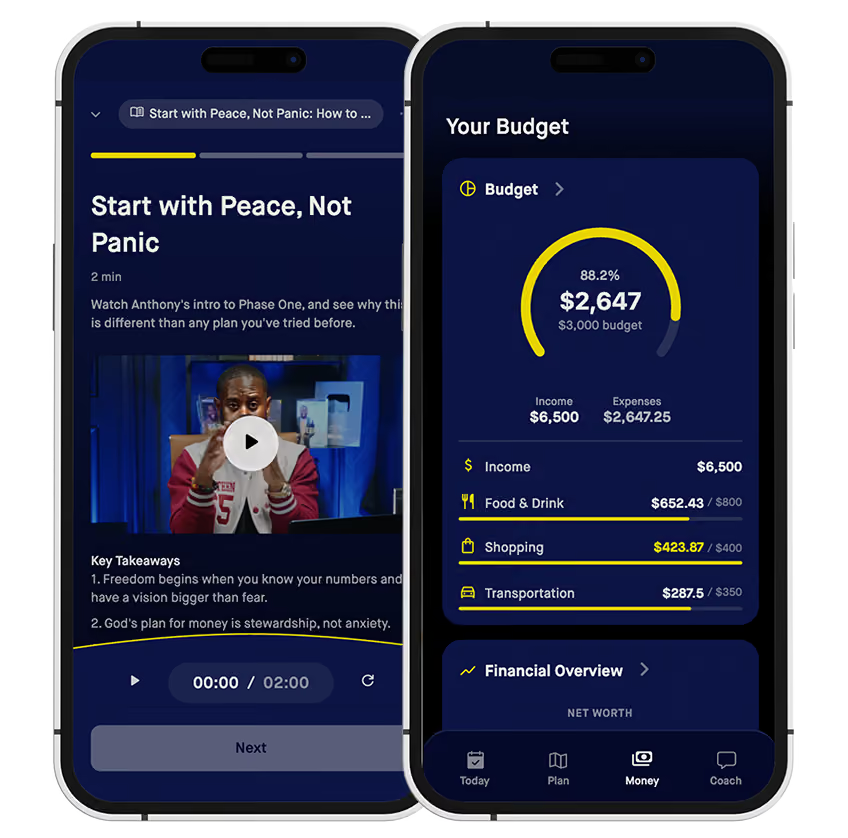
It keeps you engaged with your money. You get daily and weekly sessions that are personalized to you with AI, and a guided budget review that walks you through your spending so you stay aware of every dollar coming in and going out. That awareness is where real change begins.
It also follows the Escape Plan. It helps you build a one-month emergency fund, it celebrates your debt payoff milestones, and it connects you with a community of people working the same plan.
What to know:
It's a paid app, and I built it, so weigh my opinion with that in mind. If an app isn't in this month's budget, a written zero-based budget on paper or a spreadsheet will get you started.
Cost: $59 a quarter or $179 a year.
Bottom line: This is the app built around the principles I teach. Zero-based budgeting, personal engagement, and a clear path through every phase of the Escape Plan. Learn more at In The Black.
So Which App Should You Use?
Here's my honest answer, family:
The best budgeting app is the one you will actually use consistently.
But if you want my recommendation: use one that keeps you engaged, uses zero-based budgeting, and doesn't do all the thinking for you.
You need to know where every dollar is going. Not because someone is judging you, but because awareness is the first step to freedom.
If you're just getting started, In The Black is where I'd point you. It's simple, it's intentional, and it's built on the same principles that helped me go from struggling with money to financially free.
The Bottom Line
Budgeting apps are tools. They don't build wealth, you do.
The right app gives you clarity, accountability, and a system to follow. But the discipline, the consistency, and the decision to change? That comes from you.
You are not too far behind. You are not out of options. You are one decision away from a new story.
Pick an app. Build your budget. And get to work.
Conclusion
Look, family, there's no shortage of budgeting apps out there. But most of them are built to make you feel like you're managing your money without actually teaching you how.
Real financial freedom comes from being engaged with your money. Knowing what's coming in. Knowing what's going out. And telling every dollar where to go before the month begins.
That's not complicated. It's just discipline.
Here's your move: Download a budgeting app this week, even a free one, and build your first zero-based budget. Don't wait until next month. Don't wait until you make more money. Start with what you have, right now.
Which of these apps have you tried? Drop it in the comments and tell me what worked and what didn't. Let's figure this out together.
Keep building,

Anthony O'Neal is a bestselling author, speaker and personal finance educator. He teaches families how to get out of debt and build real wealth on any income through The Escape Plan, his show The Table with AO, and the In the Black app.
Find $516 you didn't know you had
Writing the budget is the easy part. In the Black tracks your spending against the plan and puts a money assignment in your pocket every morning. The average person finds $516 in their first 30 days.
Get startedIn the Black is my app.
Recommended for this topic
Find $516 you didn't know you had
Writing the budget is the easy part. In the Black tracks your spending against the plan and puts a money assignment in your pocket every morning. The average person finds $516 in their first 30 days.
Get startedIn the Black is my app.
more articles
Money Tips
November 3, 2026
The Spending Freeze: 17 Ways to Take Back Control of Your Money
Money Tips
November 3, 2026
The $1.86 Trillion Problem: What Student Loan Debt Really Looks Like in 2026
Money Tips
November 2, 2026
Why Your Tax Refund Might Be Smaller Than It Should Be
Money Tips
November 2, 2026
The IRS Just Changed the Rules for 2026. Here's What It Means for Your Family.
Money Tips
November 1, 2026
Budgeting With Irregular Income: A System That Brings You Peace
Money Tips
November 1, 2026
Tell Your Money Where to Go: A Simple Guide to Zero-Based Budgeting
Where this fits
The Escape Plan
Five phases, one plan. Find where you are, then take the next step.
In The Black
A coach in your pocket
Daily money assignments and real accountability, built around the Escape Plan. Know your next step every single day.
$59 a quarter or $179 a year
Get In The Black →Get the plan in your inbox.
Weekly money tips, real stories, and my free Wealth Checklist.
Free. Unsubscribe anytime.